Self-Hosted LLM: Complete Guide, Costs, Architecture & Lessons Learned (2026)

Enterprise spending on language model APIs doubled to $8.4 billion in 2025. At the same time, 44% of companies cite data privacy as the biggest barrier to AI adoption. Every prompt sent to OpenAI or Anthropic passes through external servers - for businesses handling sensitive data, that's not just an inconvenience, it's a legal risk. And it goes deeper than most users assume: a recent analysis of Claude Code's source code revealed that the tool classifies user language in real time using keyword detection, tracks behavioral patterns during permission prompts, and logs a detailed environment fingerprint each session. Whether that's standard product telemetry or over-instrumentation is debatable - but it illustrates exactly why regulated industries treat data sovereignty as a non-negotiable requirement.

But let's dispel a popular myth right away: self-hosted LLM is not always cheaper. For many projects, a cloud API remains the more cost-effective option. The real value emerges when you've found the breakeven point and built a hybrid architecture - local models for sensitive and high-volume tasks, API for complex reasoning.

This guide breaks down the economics of self-hosted LLM: what hidden costs actually make up your own infrastructure, how pricing models differ compared to APIs, and how to identify the exact moment when local hosting becomes the smarter business decision.

What is a Self-Hosted LLM (and why it matters)

A self-hosted LLM is a large language model running on infrastructure under the organization's full control: a local server, an on-premise data center, or a private cloud. Unlike cloud APIs, the model weights live on your own hardware and prompts never leave your network.

This is a fundamental difference. When you call a model through an external API, your data physically travels to the provider's servers, gets processed there, and returns. With a self-hosted approach, the entire inference cycle happens inside a controlled environment - nothing goes outside.

Why Companies Move to Self-Hosted LLMs

Companies move to self-hosted solutions not because of hype, but because of concrete business reasons.

Privacy & Compliance. For healthcare (HIPAA), finance (PCI-DSS), or the public sector, self-hosting is often the only option. No enterprise agreement with OpenAI replaces full control over your own infrastructure. One telehealth client cut monthly costs from $48k to $32k by moving AI triage to a self-hosted LLM - and simplified their compliance audit in the process.

Cost control at scale. Cloud APIs are ideal for getting started, but at millions of requests per day, owning your hardware pays off. One fintech project reduced monthly spending from $47,000 to $8,000 - an 83% saving - after switching to a hybrid approach.

Customization and no vendor lock-in. Self-hosted LLM models allow fine-tuning on proprietary data and full independence from provider pricing changes.

Latency. Local inference eliminates network round-trips. Saving 50–200ms per request has a meaningful impact on UX in real-time applications.

How to Self-Host an LLM (Step-by-Step)

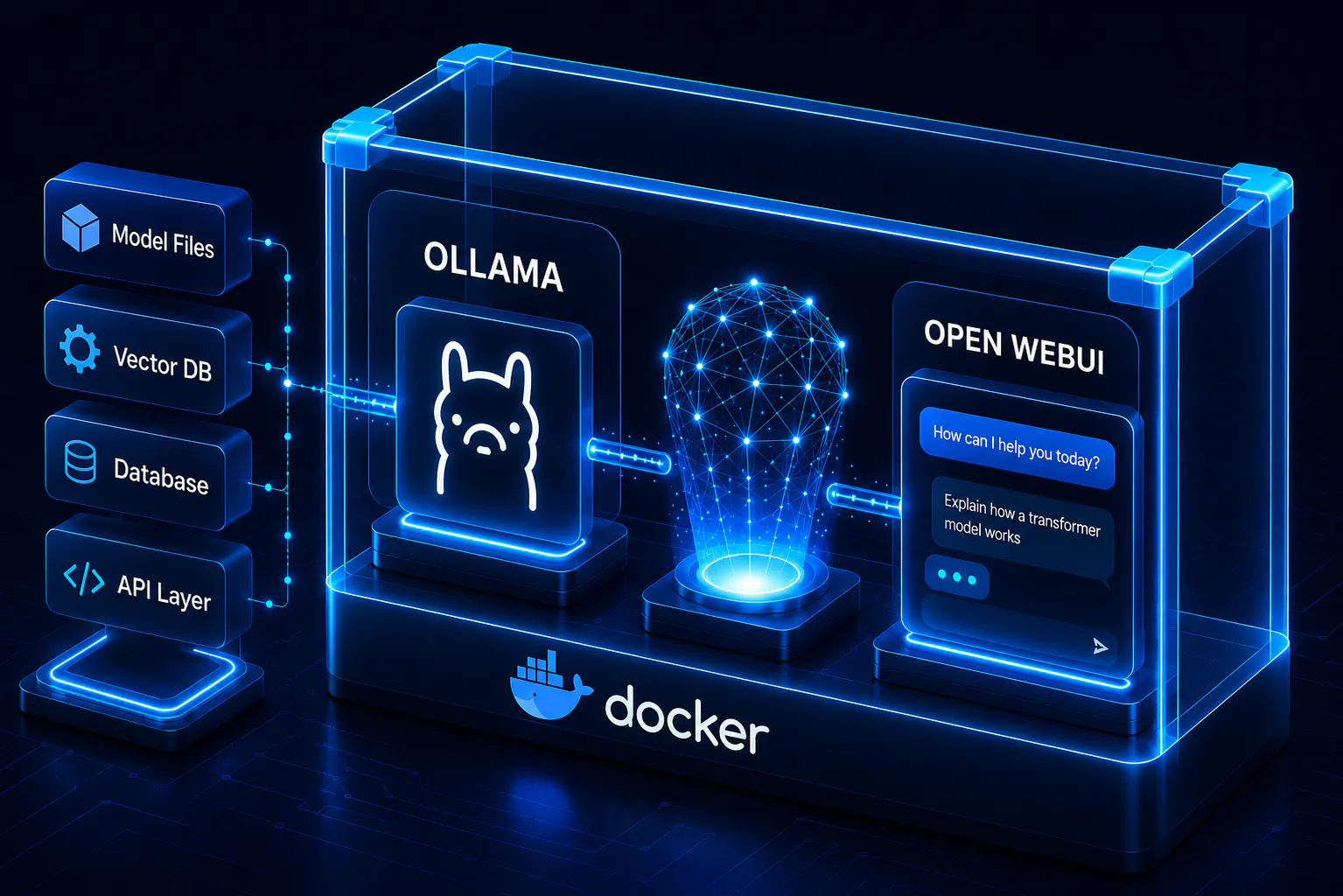
The simplest path to get started is a GUI tool like LM Studio - download it, pick a model, and you're running inference in minutes with no command line required. For those who need an API endpoint or want more control over the setup, the Docker + Ollama + Open WebUI stack is the standard choice. The following walkthrough covers that approach.

Step 1 - Docker. Install Docker Desktop for your OS. Before moving on, allocate sufficient resources in the settings: at least 8GB RAM for containers and 50+ GB of disk space for models.

Step 2 - Ollama. Runs as a Docker container in the background. It mounts a dedicated volume - meaning downloaded models persist between restarts and don't disappear when the container updates. Ollama automatically detects available hardware: if there's a GPU, it uses it; if not, it runs inference on CPU, just slower.

Step 3 - Choosing a model. This is where most people make their first mistake - reaching straight for the largest model available. A better strategy: start with a model that fits comfortably within available VRAM and evaluate it on real tasks before scaling up. A solid starting point in 2026 is Qwen3.5-9B (~6.6GB) - it runs on a single consumer GPU, supports a 262K token context window, and outperforms models more than three times its size on several benchmarks. Models download directly through Ollama from the public model registry.

Step 4 - Open WebUI. Deploys as a separate Docker container that automatically finds the running Ollama instance and connects to it. On first launch, a local admin account is created - all data stays on your own machine.

Key point about the API. Ollama automatically exposes an OpenAI-compatible API on port 11434. Any tool or application with OpenAI API support can switch to the local endpoint without any code changes - just point it to the local address instead of the external server. Once you need multiple users working simultaneously, it's time to look at vLLM and a more serious production architecture.

Self-Hosted LLM Architecture (Production Setup)

Running a model locally on a laptop and setting up production infrastructure for a team are fundamentally different challenges. Model selection, inference server configuration, memory management - all of this requires a systematic approach. And the sooner that's understood, the less time gets wasted rebuilding an already-deployed stack.

VRAM: The Defining Constraint

GPU memory is the defining constraint in any self-hosted LLM architecture. The baseline rule: 0.5GB of VRAM per billion parameters at 4-bit quantization. If the model doesn't fit entirely in VRAM, the system falls back to CPU inference - and speed drops 10–100x. This isn't a theoretical warning: in practice, the difference between 30 TPS and 1 TPS determines whether a system is usable or not.

Model SizeVRAM (Q4)Example GPUsSpeed

7–8B

4–6 GB

RTX 4060, RTX 5060 Ti

30–50 TPS

13B

8–10 GB

RTX 4060 Ti 16GB, RTX 5070

20–35 TPS

32–34B

16–20 GB

RTX 4090, RTX 5070 Ti

12–20 TPS

70B

35–40 GB

RTX 5090, Dual RTX 4090

7–12 TPS

Memory bandwidth is what separates GPUs for inference purposes - and the numbers tell a clear story. The RTX 5090 leads the consumer market with 1.79 TB/s of GDDR7 bandwidth and 32GB VRAM, delivering around 213 tokens/second on 8B models - a 67% improvement over the RTX 4090. The RTX 4090 remains the proven baseline at 128 tokens/second with 24GB VRAM, while the RTX 3090 still holds value on the used market for its 24GB capacity at a fraction of the price. For enterprise deployments, the H100 and newer B200 handle large-scale workloads, though a dual RTX 5090 setup can match H100 performance for 70B models at roughly 25% of the cost. Marketing specs and real inference performance frequently diverge - bandwidth matters far more than raw TFLOPS when it comes to token generation speed.


Quantization: Running More on Less Hardware

Quantization is arguably the most important concept for understanding the practical capabilities of self-hosted LLMs. It compresses model weights from 16-bit or 32-bit floating-point numbers down to fewer bits while preserving sufficient precision for inference. In practice, this means running significantly larger models on available hardware - without retraining and without meaningful quality loss.

A breakdown of the notation that appears everywhere but rarely gets explained:

  • Qx - the quantization level, i.e. the number of bits per weight. Q4 means 4 bits, Q8 means 8 bits. Fewer bits means less memory, but a higher chance of error when reconstructing values
  • K - the improved k-quant scheme from llama.cpp. Uses grouped blocks with additional scale data for better accuracy compared to standard quantization at the same level
  • M/S/L - what proportion of tensors receive a higher-precision sub-format. M (medium) is the balanced option, L (large) puts more tensors in higher precision with a larger file size, S (small) does the opposite
FormatSizeQuality Loss

Q8_0

~713 GB

Minimal

Q6_K

~550 GB

Negligible

Q4_K_M

~400 GB

Practically none

Moving from Q8 to Q4 cuts memory usage nearly in half with minimal quality loss. A model that theoretically requires 713GB of RAM runs on a system with less than 500GB. Aggressive quantization does have limits - rare words or complex numerical reasoning can degrade at very low bit levels. For general use, Q4_K_M remains a reliable default: maximum memory savings with minimal quality compromise. That said, newer quantization formats like AWQ and NVFP4 (supported on Blackwell GPUs) are pushing the quality-efficiency tradeoff further - worth exploring if you're running on newer hardware.

RAG Architecture: When the Model Needs a Knowledge Base

A production self-hosted LLM rarely exists in isolation. Typical enterprise architecture is built around RAG: instead of loading an entire document corpus into the context window, the system retrieves only relevant fragments through a vector database - Weaviate, Elasticsearch, or pgvector. More advanced approaches like GraphRAG and LightRAG are gaining traction, offering better handling of complex relationships between documents compared to traditional vector similarity search. The result is higher answer accuracy, fewer hallucinations, and significantly lower inference load. In practice, a 7B model with a well-tuned RAG pipeline regularly outperforms a 70B model without context on enterprise document tasks - while running on a standard consumer GPU. Kubernetes handles container orchestration, while Grafana paired with Prometheus covers monitoring and telemetry.

Security: What to Address Before Going to Production

Security: What to Address Before Going to Production

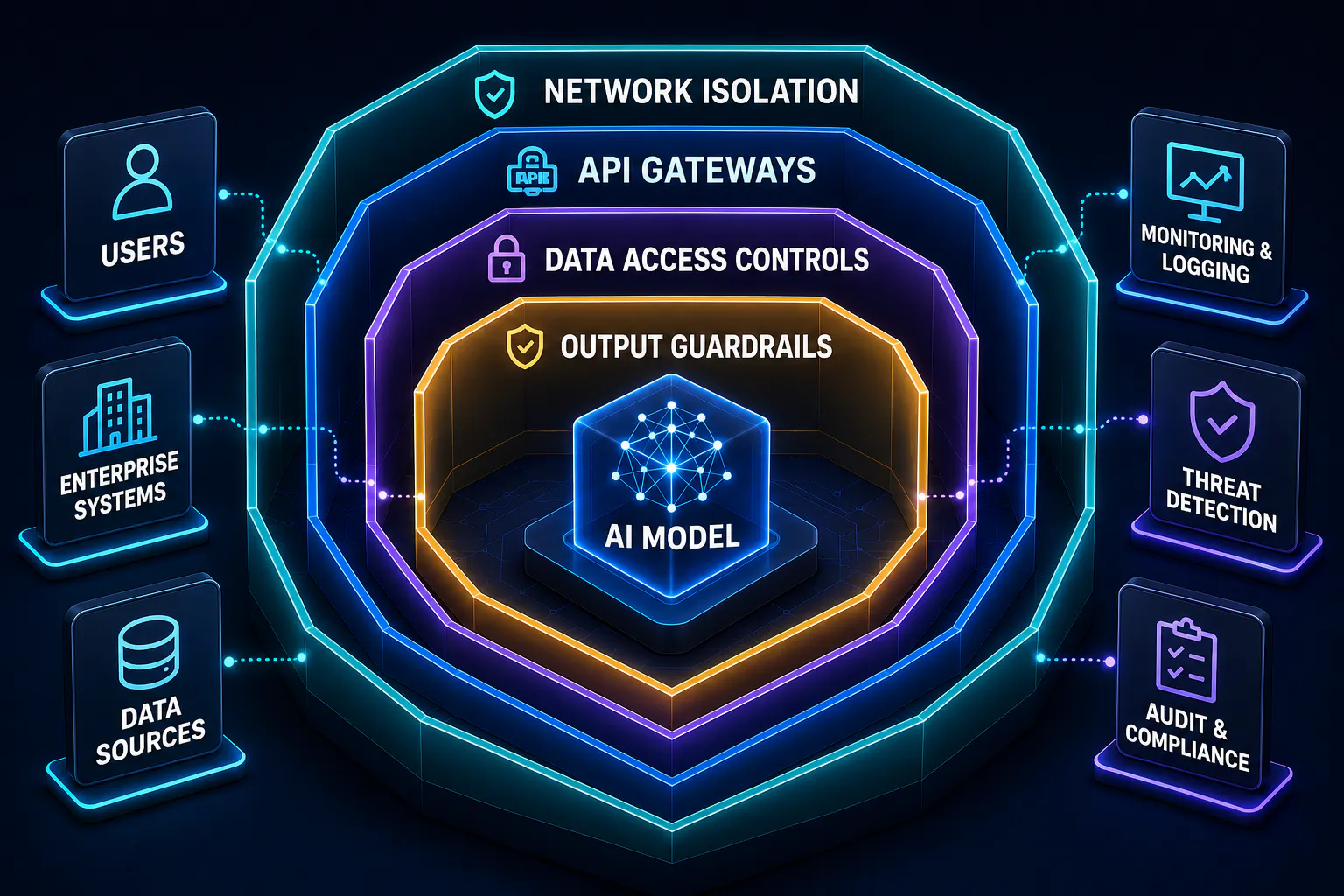
Self-hosting gives full control over data, but simultaneously shifts security responsibility onto the internal team. A few critical points that are frequently overlooked during the first deployment.

Network isolation. The inference server should not be exposed externally without a clear reason. Standard practice is to place it in a private subnet and provide access only through an internal API gateway or VPN. Ollama listens on all interfaces by default - convenient for local testing, but unacceptable for production.

Access control. Who can call the model and with what prompts is not just a security question - it's an audit question. In regulated industries, every request to the model may be part of a compliance report. Tools like vLLM support API key authentication, but full access control is typically built at the gateway layer in front of the inference server.

RAG data access control. Not every user should have access to every document in the knowledge base. A common mistake is treating the vector database as a single shared index - meaning a query from one user can theoretically surface confidential documents intended for another. The right approach is document-level permissions: either maintaining separate indexes per user role, or filtering retrieval results based on the requesting user's access rights before passing context to the model.

Output validation. Giving a model unrestricted freedom to respond is rarely acceptable in production. Common safeguards include output filtering for sensitive data patterns (PII, credentials, internal system details), guardrail layers that classify responses before returning them to the user, and hard-coded refusal rules for specific query categories. Tools like Guardrails AI or NeMo Guardrails provide structured frameworks for this - though even simple regex-based filters catch a surprising share of problematic outputs.

Model weight protection. Model files are intellectual property or the result of expensive fine-tuning. They deserve the same level of protection as any other critical data: encryption at rest, filesystem access controls, and regular backups.

Self-Hosted LLM Inference Explained

Inference is the process of generating a response token by token. The choice of tool determines both system speed and operational complexity. The key question here isn't technical - it's operational: how many people will be using the system simultaneously, and what latency is acceptable for them?

ToolTPSParallel RequestsBest For

Ollama

~41–213*

up to 4

Development, testing

vLLM

~793–5800*

unlimited

Production, high concurrency

Ray Serve

Cluster-dependent

unlimited

Enterprise ML pipeline

Hugging Face TGI

High

unlimited

HuggingFace ecosystem

Performance varies significantly by hardware and model size. Figures above reflect RTX 4090 baseline; RTX 5090 delivers 67%+ higher throughput across all tiers.

The selection logic is straightforward: Ollama for getting started and prototyping - it supports most popular models and the entire system runs from a single command. The moment real users appear, vLLM without compromise: its PagedAttention algorithm delivers 19x higher throughput and keeps P99 latency below 100ms at 128 concurrent requests. Ray Serve and Hugging Face TGI are for teams with the corresponding ML stack and expertise. The typical path: start on Ollama, migrate to vLLM when moving to production.

Cost of Self-Hosting LLMs (The Economics)

What the Real Cost Actually Looks Like (TCO)

The most common mistake when evaluating a self-hosted LLM is counting only the GPU cost. The real Total Cost of Ownership has three components - and the most expensive one isn't the first thing that comes to mind.

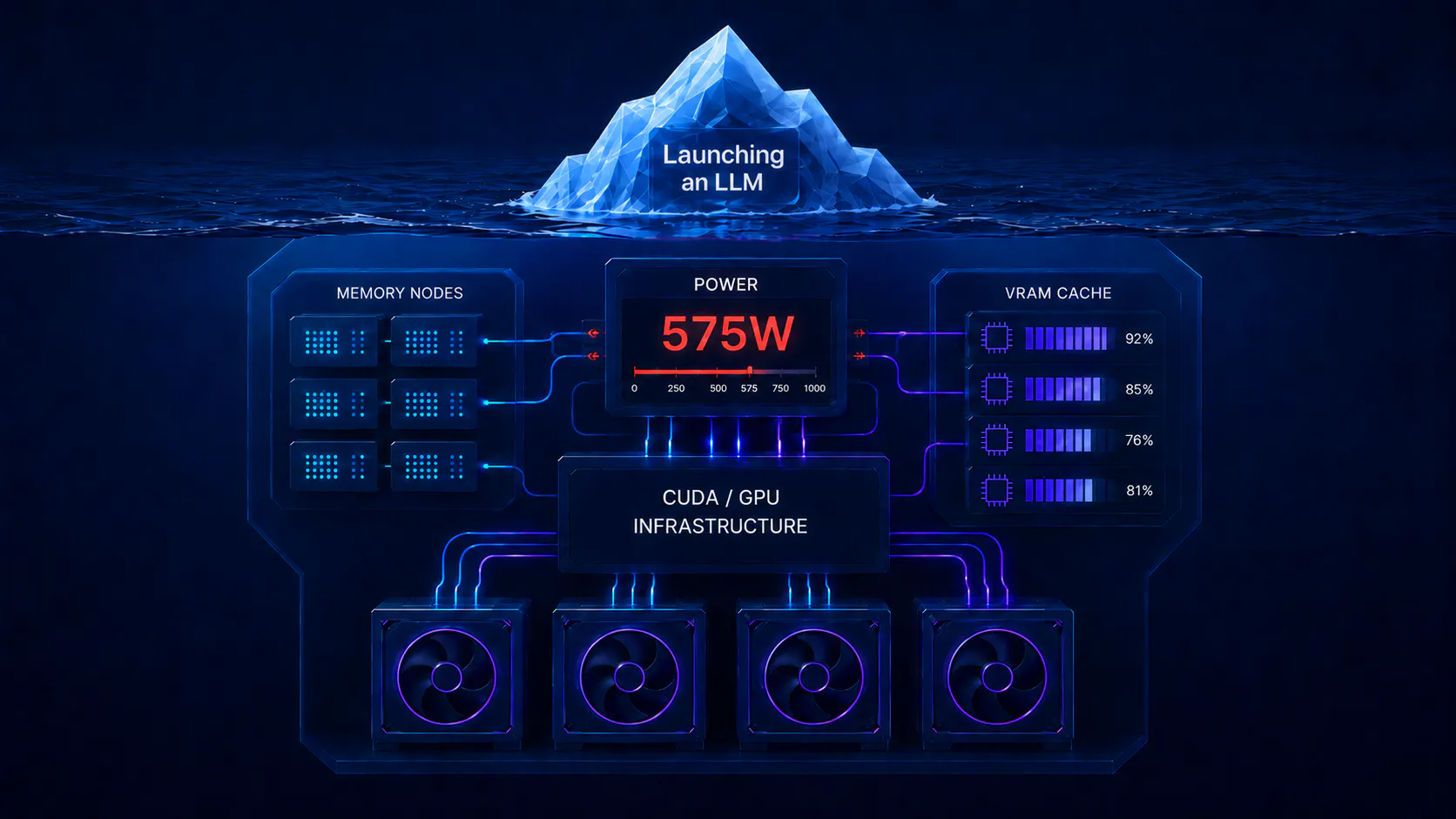
Capital expenditure - hardware: GPU, cooling system, appropriately rated power supply. The RTX 5090 carries an official MSRP of $1,999, but due to ongoing GDDR7 memory shortages, street prices in early 2026 are running $3,500–4,000+. It also requires a 1,200W+ PSU and robust cooling given its 575W TDP. The RTX 4090 remains available on the used market at $1,600–2,000 and is still a solid baseline for 7B–13B model inference. In a multi-GPU setup, add power distribution and a server chassis on top of that.

Electricity - the line item people most often forget. The RTX 5090 draws 575W under load. At an average cost of $0.16 per kWh, that adds up to $65+ per month for a single GPU alone - and that's before accounting for the rest of the system. When compared against OpenAI API costs - GPT-4o runs $2.50/1M input tokens and $10/1M output tokens, while the more affordable GPT-4o-mini costs $0.15/$0.60 per million tokens - the math on electricity alone starts to look more reasonable at scale.

Operational costs - the biggest hidden expense. An MLOps engineer who updates models, debugs CUDA errors, and monitors performance costs significantly more than the hardware itself. If that expertise doesn't exist within the team, this cost is easy to underestimate during budget planning.

Pricing Models

ApproachData PrivacyComplexityPricing Model

API (OpenAI, Anthropic)

Data on external servers

Minimal

Pay per token

Self-Hosted

Full control

High

Hardware + maintenance

Managed (Prem AI)

Full control

Medium

Subscription

API is ideal for getting started: no idle costs, no infrastructure headaches. Self-hosted - after the initial investment, you eliminate per-token charges and API rate limits, but you pay with your team's time and expertise. Managed platforms sit in the middle: the benefits of self-hosting without needing to build an MLOps team.

Breakeven Point

The industry rule of thumb: a self-hosted LLM becomes financially competitive at volumes above 2 million tokens per day. Below 1M tokens per day, the API is cheaper. At a stable load of 10M+ tokens per day, self-hosting pays back within 6–12 months.

Daily VolumeGPT-4o Mini (monthly)Self-Hosted Local Model (monthly)Winner

500K

~$15

~$850

API

2M

~$60

~$850

Roughly even

10M

~$300

~$850

Self-Hosted

50M

~$1,500

~$850

Self-Hosted (significantly)

There's an important nuance that shifts the math in self-hosting's favor faster than the table suggests: one infrastructure can serve multiple applications simultaneously. If a single GPU server runs an internal helpdesk bot, a document analysis system, and a coding assistant for developers - the fixed infrastructure cost is distributed across all workloads. Three applications at 700K tokens per day each add up to 2.1M - already crossing the breakeven point, even though each one individually would look uneconomical for self-hosting. The same logic applies to fine-tuning: every model training run through an API provider costs extra, while on self-hosted infrastructure it's simply using hardware you've already paid for.

Best Self-Hosted LLM Models & Tools

Models: Choosing for the Right Task

The most common mistake is choosing a model by size rather than by task. Among the available options, there are always models that fit within the available VRAM while delivering sufficient quality for the specific use case.

General tasks and reasoning: The top of the open-source leaderboard in 2026 looks quite different from a year ago. GLM-5 (744B) and Kimi K2.5 (1T) lead overall rankings, with Qwen 3.5 397B and GLM-4.7 close behind. For teams that need a strong balance of reasoning and coding without running a massive model, GLM-4.7 355B is a standout - it scores 85.7 on GPQA Diamond and 73.8 on SWE-bench Verified, outperforming many larger alternatives. Qwen 3.5 remains a strong multilingual choice with 262K context window support out of the box.

Coding: For code generation, Kimi K2.5 leads the open-source field with 99% HumanEval and 85% LiveCodeBench under an MIT license. For real-world bug fixing in production codebases, GLM-5 and GLM-4.7 are the stronger picks - GLM-4.7 scores 94.2% on HumanEval and 73.8% on SWE-bench Verified, which tests actual GitHub issue resolution rather than synthetic benchmarks.

For constrained hardware: Qwen3.5-9B is the standout choice for 8GB VRAM in 2026 - it fits entirely in GPU memory, delivers 54–58 tokens/second, and supports a 200K+ context window at Q4_K_M quantization. GLM-Z1-9B is a strong alternative for math-heavy tasks. For systems with 16GB VRAM, Mistral Small 3.1 24B opens up - it fits comfortably at Q4_K_M and delivers a significant quality jump over 9B models without requiring the 40GB VRAM of a 70B class model. In most practical scenarios, a well-quantized smaller model outperforms an unquantized larger one.

All listed open-source self-hosted LLM models are available through Hugging Face under Apache 2.0 or MIT licenses for commercial use.

Tools: The Selection Logic

LM Studio - the simplest starting point. A graphical interface with no command line required, built-in model search and download, automatic optimization for available hardware. Includes a built-in local inference server compatible with the OpenAI API. The ideal entry point before diving into Ollama and Docker.

Ollama - the next step for developers. More control, a straightforward path to a production-ready API endpoint, and an active integration ecosystem.

vLLM - for production with real users. Unmatched in throughput and serving performance.

Prem AI - managed self-hosting for companies without an MLOps team. Deploys on your own infrastructure, but the provider handles all operational complexity. Swiss jurisdiction, built-in fine-tuning pipeline, OpenAI-compatible API. Among enterprise-grade self-hosted LLM services, one of the most mature options available for regulated industries.

Fine-Tuning: When a Standard Model Isn't Enough

Fine-tuning is the process of further training an existing model on your own dataset. Unlike RAG, which connects external knowledge at inference time, fine-tuning modifies the model weights themselves. The result is a model that doesn't just know about your domain - it thinks in its terms and style.

The most widely used approach is LoRA (Low-Rank Adaptation): instead of retraining all billions of parameters, LoRA adds small adapter matrices on top of the existing weights. This reduces memory requirements and training time by an order of magnitude - fine-tuning a 7B model on a single RTX 5090 or RTX 4090 takes hours, not weeks.

When it makes sense: a law firm that wants the model to respond in a specific legal style; a healthcare organization with proprietary terminology; a product where the model must adhere to a strict tone of voice. RAG answers the question "what does the model know" - fine-tuning answers "how does it think and respond."

What You Should Know Before Self-Hosting LLMs

Most guides explain how to launch a model. Far fewer talk about what breaks expectations after the first run.

Context window is not free. Doubling the context window - say, from 8K to 16K tokens - has minimal impact on inference speed, but significantly increases VRAM consumption: the key-value cache grows with context length, and going from 8K to 16K can add 15–20% to memory usage. Push it further and you may find the model no longer fits in VRAM at all, forcing a fallback to CPU inference. Instead of maxing out context, investing time in a RAG architecture is a more effective solution: it keeps memory usage predictable and delivers more relevant context than a bloated window ever could.

Electricity costs real money. A high-end GPU like the RTX 5090 draws 575W under load - that's $65+ per month for a single GPU alone. Even older cards like the RTX 4090 at 450W add $50+ monthly.

NVIDIA isn't the only option. AMD RX 7900 XTX with 24GB VRAM and Intel Arc A770 both have community support through ROCm and IPEX LLM respectively, and can handle basic inference on well-supported models. However, a large portion of the ecosystem is deeply tied to CUDA: many models, optimized kernels, and inference frameworks are NVIDIA-first or NVIDIA-only. Expect more configuration friction, reduced framework compatibility, and occasional cases where a model simply won't run outside of CUDA. For anything beyond straightforward inference, NVIDIA remains the practical choice.

A bigger model isn't always the right answer. A smaller model with a solid RAG knowledge base regularly outperforms a larger model without context - and does so faster, on cheaper hardware. Tools like JSON Toolkit or Pandas Dataframe let the model run code to find answers instead of loading an entire dataset into the context window.

MoE models are a category of their own. Mixture-of-Experts architecture routes each token through only a selected subset of "expert" layers rather than activating the entire network. This means inference is significantly faster and cheaper per token - a 235B MoE model with 22B active parameters costs roughly as much to run as a 22B dense model, despite having far more total capacity. The catch: the full model still needs to fit in memory, since all expert weights must be loaded even if only a fraction activates per token. The practical benefit is quality-per-compute, not memory savings.

Start with LM Studio. Before diving into Docker and the terminal, LM Studio delivers a complete self-hosted LLM experience with zero configuration. It saves hours of setup time at the start and helps clarify whether self-hosting is actually the right fit for a specific use case.

When You Should NOT Self-Host an LLM

Objectivity matters more than hype. Self-hosting is a tool, not a goal - and there are three scenarios where it clearly loses.

Low or unpredictable request volume. At under 1 million tokens per day, the API will be cheaper - the infrastructure simply won't pay for itself. With unpredictable traffic, a self-hosted server has to be sized for peak load, which means it sits idle most of the time. APIs don't have this problem: you pay for exactly what you use.

Need for frontier models. GPT-5, Claude Opus 4.6, and Gemini 3.1 Pro are not available for self-hosting.The gap between top proprietary models and the best open-source alternatives is narrowing, but for tasks requiring complex multi-step reasoning, it still exists.

No MLOps expertise. Self-hosted inference is not "set it and forget it." Models need updating, CUDA errors happen at the worst possible moments, and performance degrades as load patterns change. If the team doesn't have someone with the right expertise, the hidden cost of maintenance will quickly outpace any savings on token costs.

Self-Hosted vs API vs Managed Platforms

CriteriaAPISelf-HostedManaged

Where data runs

Provider's cloud

Own infrastructure

Own infrastructure

Privacy

External servers

Full control

Full control

Complexity

Minimal

High

Medium

Pricing

Per token

Hardware + maintenance

Subscription

Frontier models

Yes

No

No

Fine-tuning

Limited

Full

Built-in

Rate limits

Yes

No

No

Hybrid Approach: The Most Effective Architecture

Most discussions reduce to a binary choice: either fully API or fully self-hosted. In practice, the most effective architecture is hybrid - and companies that get there report 40–70% cost savings compared to a fully API-dependent stack.

The load distribution logic is straightforward: local self-hosted LLM models handle simple, high-volume, and sensitive tasks - classification, data extraction, processing documents containing personal data. The model size that's "local-grade" has shifted significantly: in 2026, a well-quantized 32B model handles tasks that required a 70B model two years ago. API access to frontier models remains reserved for tasks where the quality gap is still real: complex multi-step reasoning, nuanced instruction following, and creative tasks where output quality is business-critical and volume is low.

What this looks like in practice. A support team processes hundreds of repetitive requests per day - category classification, form data extraction, generating standard responses. This is the ideal workload for a local model: predictable volume, straightforward tasks, often containing customer personal data that can't be sent externally. Meanwhile, the legal team analyzes complex contracts once a week and needs deep reasoning - here, an API call to a frontier model like GPT-5 or Claude Opus 4.6 is justified because volume is low and quality is critical. Developers use a coding assistant daily, but a local GLM-4.7 or Qwen3.5 handles routine autocompletion and code review, while genuinely novel architectural decisions or unfamiliar codebases go to a larger frontier model via API.

The result: sensitive data never leaves the infrastructure, routine tasks generate no API costs, and complex reasoning gets the best available tool. This approach solves two problems at once - cost efficiency and compliance - without sacrificing quality where it genuinely matters.

Conclusion

Self-hosted LLM is not about running a technical experiment or saving money for its own sake. It's a strategic decision that makes sense under specific conditions: sufficient token volume, compliance requirements, or the need to fine-tune on proprietary data.

The technology has matured to the point where the question is no longer "is it possible" - but "is it the right call right now, for this specific use case." Open-source models in 2026 have closed most of the gap with proprietary alternatives for the majority of practical tasks. Tools like Ollama and vLLM have made deployment accessible even for small teams. And understanding the real economics - TCO, breakeven point, hybrid approach - makes it possible to base decisions on numbers rather than hype.

For most companies, the right answer is not a binary choice between self-hosted and API, but a hybrid architecture where each tool is used where it genuinely wins. Self-hosted for sensitive data, predictable workloads, and customization. API for frontier models and unpredictable traffic.

The bottom line is simple: companies that already understand the economics and architecture of self-hosted LLM today will hold a significant advantage - both in data control and in AI infrastructure costs over the long term.

Read Other articles

The Lifting Force of DevOps Strategy: How to Make Your Project Take Off thumbnail

MLOps

Dmitriy Konstantynov

Dmitriy Konstantynov

CEO, co-founder

advanced


Jul 18, 2023

The Lifting Force of DevOps Strategy: How to Make Your Project Take Off

Are you not getting the most out of DevOps? Perhaps, there’s some problem with your strategy. Read to learn more about the power of the...

Mastering MLOps: A Guide for Startups to Improve ML Deployment  thumbnail

MLOps

Dmitriy Konstantynov

Dmitriy Konstantynov

CEO, co-founder

advanced


Jul 04, 2023

Mastering MLOps: A Guide for Startups to Improve ML Deployment 

Our article shows how to overcome the challenges of ML engineering with MLOps. Learn about the best practices for effective MLOps infrastructure.

Yevhenii Hordashnyk

Let's arrange a free consultation

Just fill the form below and we will contaсt you via email to arrange a free call to discuss your project and estimates.